
DISNEY+ / DESIGN & RESEARCH / SHIPPED
Product
Video Tiles
A video-integrated tile system. I designed an adaptable video-integrated tile format that seamlessly transitions from static art to rich video previews upon user focus.
Project Details
Role
Co-Lead Designer and Lead Researcher
Platform
All Living Room Devices
Timeframe
90 days
Key Partners
Design, Product, Engineering, QA, Programming, Data, Artwork, Studios
Problem
Static Info
Static browse pages fail to capture the cinematic energy of streaming content. Traditional vertical artwork relies entirely on static imagery to convey a title’s tone, genres, and production value.
User research indicated that viewers frequently struggle to evaluate new or unfamiliar content from a single image, leading to decision fatigue and increased drop-off rates.
Solution
I co-led the transition of the Disney+ homepage from a static asset experience to a dynamic video ecosystem that subscribers use as a decision making tool to decide their next watch.
Due to our success, I am currently leading the design strategy to scale and optimize this video framework for Mobile and Web platforms next.
Impact
Engagement in curated sets.
Drove a massive +53.5% CTR increase for key content trays like Newly Added.
Lift in Homepage hours.
Proven net-positive platform engagement and overall streaming time.
Spike in Video Previews.
Massively increased user curiosity and visual discovery across the interface.
01 / MOVING FROM STATIC IMAGERY TO DYNAMIC DISCOVERY
How might we bring video into the browse experience to give subscribers instant narrative clarity without causing fatigue?

02 / DISNEY+ BROWSE GRID

What we started with: Disney+ browse experience with static artwork.
Disney+ originally relied entirely on static poster artwork across the interface, offering a dense but motionless browse experience.
While visually rich, static images couldn’t capture the tone, pacing, or cinematic feel of our content - forcing subscribers to rely heavily on trial-and-error browsing.
This presented a major opportunity for our team to evaluate the entire UI and identify high-impact touchpoints where dynamic video integration could streamline discovery.
Experiment 1: Vertical Videos
Invaluable data to see impact only one variable: video. Rest of the browse patterns remain the same. Valuable phase for Engineering to start with a background swap.
Experiment 2: Expanded Videos
Test additional changes to browse pattern that diverge from our status quo: added metadata, larger video area, horizontal video, and fixed focus
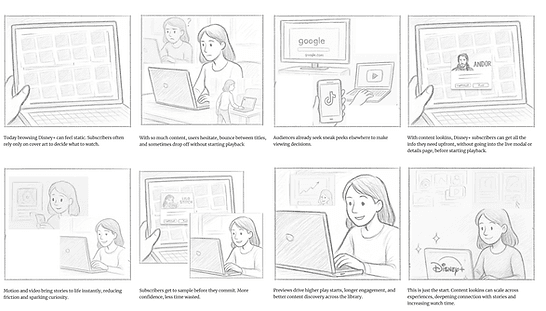
Video in Disney+ Jam Prior to project kickoff, I co-facilitated a cross-functional design jam to explore how video could elevate discovery across Disney+. We framed our exploration around a core How Might We:
How might we bring video into the browse experience to give subscribers instant narrative clarity without causing fatigue?
Storyboard: Exploring how to leverage video directly in the browse grid.

03 / EXPERIMENT 1: VALIDATION VIA APPLE TV (MVP)
To gather rapid data, we started with standard vertical video assets cropped to keep core subjects centered.
We partnered with Apple TV engineering, our fastest-delivering client platform, to deploy our MVP to validate playback performance and baseline engagement.
Vertical Video Tiles: Browse patterns remain the same for MVP
Impact: Vertical Videos Experiment
Instant Evaluation
Subscribers rely on a strict hierarchy of high-utility metadata to evaluate titles in under 3 seconds.
Context Preservation
Expanded cards act as ”mini details pages” directly in the grid, letting users evaluate content deeply without navigating away.
Tailored Models
Different content types demand distinct treatments; sports/live require score controls and instant play, while movies rely on ambient narrative clips.
04 / QUALITATIVE RESEARCH

Paper Prototyping: Moderating sessions
Paper Prototyping
In parallel, I conducted internal paper prototyping sessions to test physical card layouts and identify the ”at-a-glance” metadata fields needed for quick decision-making.
This research directly shaped our expanded video tile UI by proving subscribers prioritize high-level orientation tags (like Title, Year Released, and Video Autoplay) over secondary social or deep detail features.
Impact: Paper Prototyping
Instant Evaluation
Subscribers rely on a strict hierarchy of high-utility metadata to evaluate titles in under 3 seconds.
Context Preservation
Expanded cards act as ”mini details pages” directly in the grid, letting users evaluate content deeply without navigating away.
Tailored Models
Different content types demand distinct treatments; sports/live require score controls and instant play, while movies rely on ambient narrative clips.

User Testing
I designed and moderated an end-to-end research study comparing vertical and horizontal expanded video prototypes.
After synthesizing subscriber insights, I presented our findings to cross-functional partners and executive leadership - securing buy-in and alignment to advance the expanded horizontal design.
Subscriber Research & Validation: Moderating sessions to evaluate prototypes and key decision moments.
Impact: User Testing
Premium Perception
Expanded horizontal tile formats elevate product quality and user value.
Interaction Mechanics
Anchored focal points reduce cognitive strain during 10ft remote navigation.
Scalability
Partial video rollouts create cognitive dissonance and feel like platform errors.
05 / DESIGN EXPLORATIONS & DECISIONS

Fixed Focus vs. Floating Focus
Disney+ historically used a floating focus model (where the selection outline moves across a static grid).
We shifted to a Fixed Focus model, anchoring the active video tile to a predictable landing zone while the grid moves beneath it - reducing visual strain as video previews auto-play.
Fixed Focus with Expanded Horizontal Layout: Recommended path forward

Expanded Horizontal vs. Vertical Layout
Standard poster art on Disney+ uses vertical 2:3 aspect ratios. We initially tested cropping video into vertical cards for quick delivery.
Subscriber research revealed vertical video previews felt cramped and more like a social feed. Transitioning to an Expanded Horizontal Format provided a cinematic, premium canvas that accommodated video motion and critical metadata cleanly.
Floating Focus with Vertical Layout: Disney+ previous model

Metadata Competitive Analysis & Prioritization
Metadata Competitive Analysis & Prioritization
Metadata Prioritization
An expanded tile offers more real estate, but overloading it with data creates visual clutter.
Through paper prototyping, user testing and previous research, we established a strict metadata hierarchy:
Instant Evaluation: Title Logo, Genre Badges, Year Released (crucial for distinguishing originals from remakes), and Runtime/Seasons.
Clutter Reduction: Social sharing and deep ratings were removed or surfaced contextually to keep the browse experience fast and lightweight.
06 / VIDEO TILES (IN PRODUCTION)

Video in Browse Experience Program: Changes we made to Disney+ over the past year.
07 / VIDEO TILES ON MOBILE


Mobile
Following the proven success of video tiles on TV, we secured executive buy in to scale the framework across ecosystems.
I am currently leading the design initiative to bring motion-first discovery to Mobile - exploring responsive tile layouts and gesture-based interaction models.
Partnering closely with Product and Engineering, we are preparing a suite of experimental variants to test and optimize performance.
Mobile prototypes: Exploring video tile variants for experimentation.