
Product
Customization is at the heart of everything we do at Minted. A redesign of the core customization tool for personalizing cards, photos, text, envelopes, and stamps.
Project Details
Role: Lead Product Designer, Lead Researcher, Copy Writer, Project Manager.
Timeline: 2018–present, as documented in the original presentation.
Partners: Product Manager; Engineering (in-house and offshore); Product Vice President; Brand and Marketing; Data and Analytics; Holiday General Manager; Design Associates; Fulfillment; Customer Service; Chief Executive Officer.
Problem
High customer contacts increased the load on customer service and the cost to the company. Only 25% of customers used the non-optimized mobile experience. Customers were confused about how to advance through the tool.
Goal
Redesign the customizer experience and ensure that the various product kinds Minted offers can easily move into the new experience, starting with holiday.
Success metrics
Conversion, customer satisfaction, average transaction value, customer contacts, latency, and mobile usage.
Impact
Conversion lift
Increase in average transaction value
Reduction in reprints caused by UX issues, reducing customer service contacts
Increase in holiday customers rating card layout customization “excellent”
Increase in mobile usage
01 / THE OPPORTUNITY
50% of consumers are interested in purchasing customized products for themselves, friends, and family. Source cited in the presentation: Deloitte.
The original presentation forecast $75 million in revenue from new customizer rollouts in 2022. This was an expectation, not a reported realized outcome.
Market context: $7.5 billion in holiday cards, $5.9 billion in general stationery, and $26.3 billion in personalized gifts.

02 / UNDERSTANDING THE CUSTOMER
97% of Minted’s customer base was female. Most customers were 33–44 years old, with an average household income above $100,000 annually.
Empathy allows us to create with purpose.
Research combined FullStory analytics, competitive analysis, user testing of current and proposed experiences, user interviews, shop-alongs, customer service email screening, SME interviews with Design Associates, and a site map.

03 / A CONTINUOUS DESIGN PROCESS
Research and insights: build understanding of problems and stakeholders.
Strategy: inform product and experience strategy based on that understanding.
Iterate and design: work in iterative design sprints to create the product design.
Validate and deliver: validate designs through testing and work closely with engineering.
Continuous delivery: review with Product Management, Engineering, and stakeholders.

04 / MAPPING THE SHOPPING JOURNEY
The holiday card journey moves through Browse, Shortlist, Customize, Browse again, Break, Finalize, and Purchase. Customers may return for a second or third session before finishing.
Opportunities: make favorite designs easier to save and return to, break decision points into an easier-to-digest model, support smooth transfers between devices, and clarify the “Buy now, personalize later” option.
The site map explores landing pages, categories, product detail pages, text entry, saved designs, sign-in, loading shared data, wedding websites, and personalized samples.


05 / THREE PRODUCT PRINCIPLES
01 — Guide customers. “There’s customization options scattered all over the page. It is hard to figure out quickly what I can do.”
02 — Simplify customer load. “I can’t see my changes to text and photos immediately, so it takes a long time to position and edit them perfectly and I can’t drag and drop my photos into the design.”
03 — Encourage discovery. “I could customize my stamp which I have never done. That would drive my friends crazy.”

06 / WHERE THE OLD EXPERIENCE FELL SHORT
Customers navigated scattered controls, separate photo-editing dialogs, and text-editing overlays without seeing their changes directly in context.
The original experience included card browsing, envelope options, custom stamps, photo editing, and text editing. These screens document the starting point.


07 / EXPLORING THE NEW STRUCTURE
Bones provide support and help form shape.
Early explorations tested the editing canvas, navigation between card surfaces, option panels, saved designs, addressing, and support.
Chunking means breaking information into smaller pieces so people can more easily remember what they see.

08 / GLIDE THROUGH CHOICES
A one-of-a-kind design should feel easy to create on both desktop and mobile.
The mobile structure has four parts: Navigation and Promos for sales, promo codes, and subtotal; a Stepper to navigate where customers want to go; a Canvas to zoom in, add photos, and edit text; and a Control Center to make decisions efficiently.


09 / SEE YOUR CHANGES COME TO LIFE
Real-time updates in context allow customers to make pertinent and informed decisions efficiently.
The photo library, photo selection, rotation, filters, and auto-enhance controls keep editing close to the design.
Photo management flows cover adding and deleting images, selecting from a device library, repositioning photos, and warning customers about low-resolution images before print.


10 / IT’S ALL ABOUT THE LITTLE DETAILS
Text editing provides font style, size, alignment, ink and foil colors, and nudging controls.
Mobile separates Edit Text from Text Options, preserving the design context while customers refine their choices.
Encourage discovery: help customers discover features they did not know they needed, including a personalized website accessible through a QR code on the back of a card.


11 / ROLLOUT AND NEXT STEPS
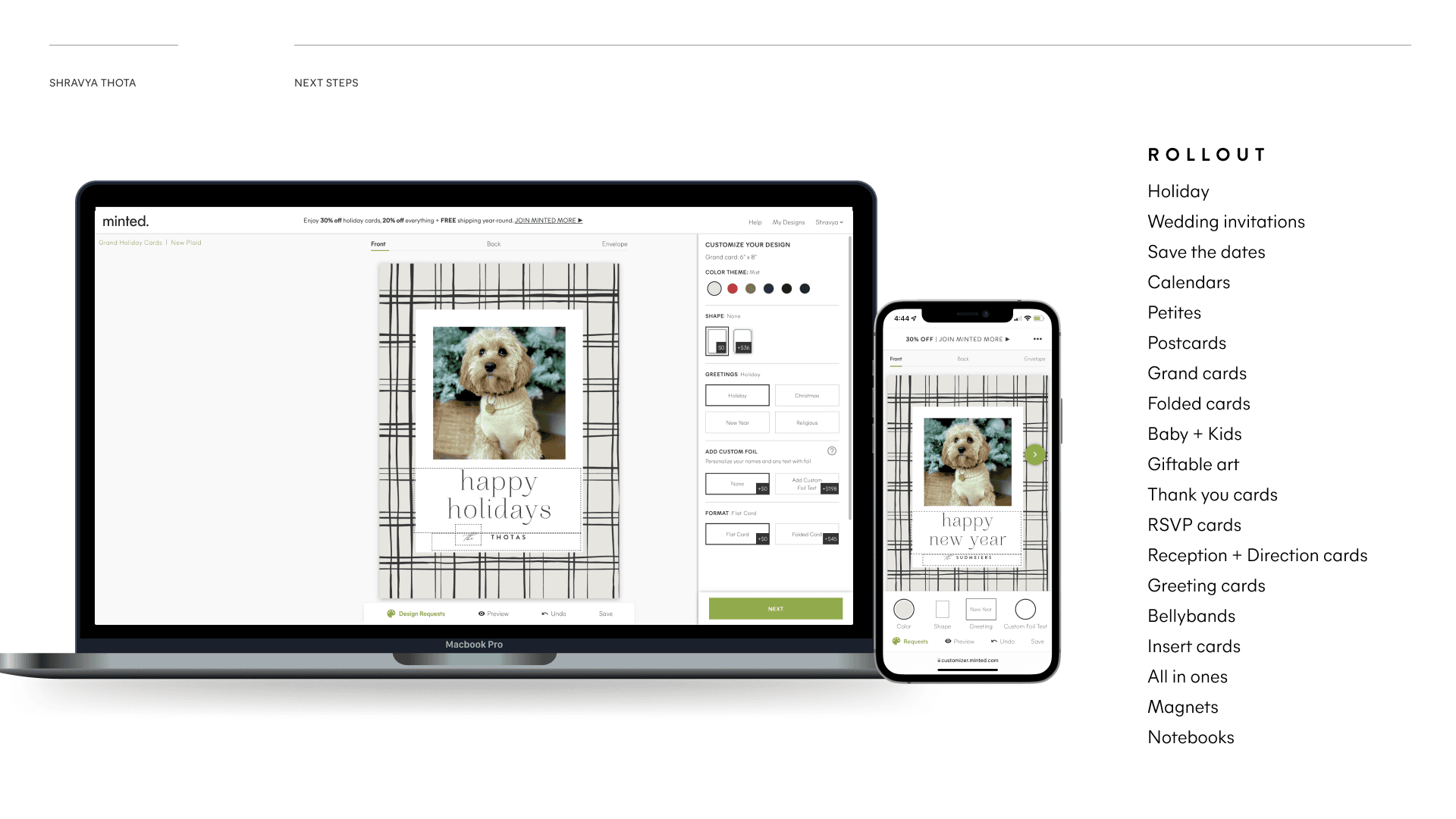
The planned rollout extended beyond Holiday to Wedding invitations, Save the dates, Calendars, Petites, Postcards, Grand cards, Folded cards, Baby and Kids, Giftable art, Thank you cards, RSVP cards, Reception and Direction cards, Greeting cards, Bellybands, Insert cards, All in ones, Magnets, and Notebooks.
12 / EMPATHY CREATES PURPOSE
The reported outcomes were a 25% conversion lift, 12% increase in average transaction value, 70% reduction in reprints caused by UX issues, 42% increase in holiday customers rating layout customization “excellent,” and 36% increase in mobile usage.
Pitching and selling are critical design skills.
There are must-haves, and then there are nice-to-haves.
A great handoff saves time and effort.